


 You’ve probably heard leadership talk about cloud migration or Microsoft 365 modernization. These phrases often come up in company updates, IT meetings, or strategic planning discussions. While they may sound like big technical initiatives happening behind the scenes, they actually have a direct impact on how you work day to day.
What Does “Moving to the Cloud” Actually Mean for You?
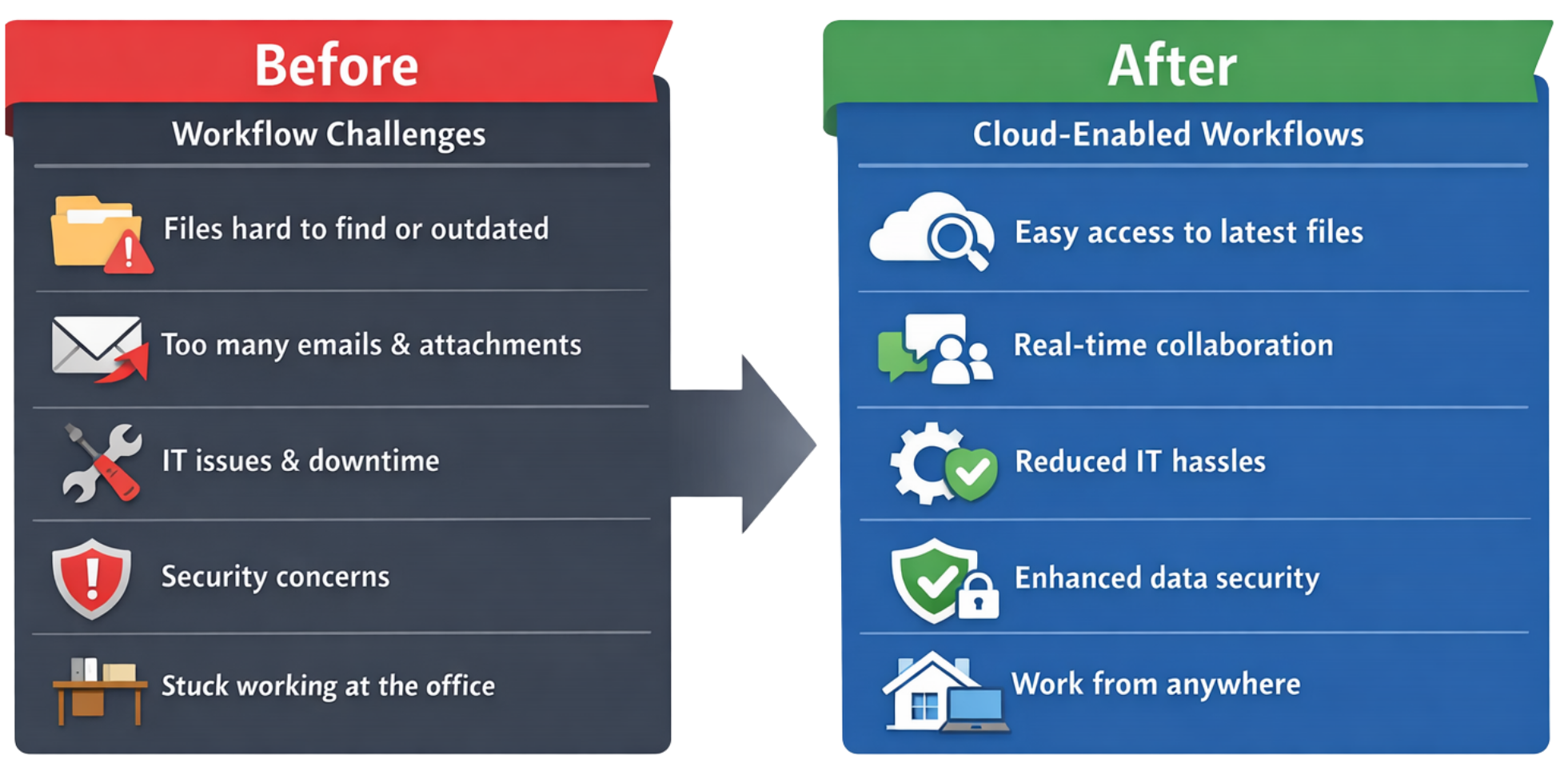
It might sound technical, but for most employees, it simply means:
-
Easier access to files
-
Better collaboration
-
Fewer IT headaches
-
Stronger security
-
More flexibility to work from anywhere
When companies migrate to Microsoft 365, the goal isn’t just to upgrade technology. It’s to improve how people work every day.
Life Before Cloud Modernization
If your organization has been operating on older, on-premise systems, you may recognize some of these frustrations:
- Needing VPN access just to open a document
- Slow file servers
- Confusion over which version of a file is correct
- Email attachments are going back and forth endlessly
- System outages are disrupting your day
- Limited ability to collaborate remotely
These are common challenges for companies that haven’t fully migrated to the cloud. Microsoft 365 cloud modernization addresses these issues directly.
Faster Access to the Files You Need
Transitioning to Microsoft 365 offers a significant improvement in how you retrieve, share, and work with your documents. No longer bound by the limitations of traditional on-premise infrastructure, employees can easily locate and open files without the hassles of outdated systems or location constraints. This means that whether you’re responding to urgent requests or collaborating with colleagues across the globe, your files are just a few clicks away, enabling greater productivity and agility in your daily operations.
With Microsoft 365 migration:
- Files are stored in SharePoint and OneDrive
- Documents are accessible securely from anywhere
- You no longer rely on physical office servers
- VPN dependence is reduced or eliminated
Instead of waiting for slow network drives, you get faster, more reliable access, whether you’re in the office, at home, or traveling.
Real-Time Collaboration (No More “Final_v7_Updated” Files)
With Microsoft 365, the days of juggling multiple versions of files and endless email attachments are gone. Employees can collaborate on documents seamlessly, whether they’re working together in the same office or remotely from different locations. These tools provide a unified platform where everyone can contribute without worrying about overwriting each other’s work or losing track of the latest updates. This streamlined process makes teamwork more efficient and keeps projects moving forward smoothly.
Using Microsoft Teams, SharePoint, and OneDrive:
- Multiple people can work on the same document at once
- Changes save automatically
- Version history is tracked
- Comments and edits are visible instantly
This eliminates confusion, reduces email overload, and speeds up projects. Cloud modernization improves teamwork across departments.[/vc_column_text][/vc_column][/vc_row]
Stronger Security (Without Extra Work for You)
You may notice new security measures after Microsoft 365 migration, such as:
- Multi-factor authentication (MFA)
- Password reset prompts
- Secure file sharing controls
While these changes may feel different at first, they protect:
- Company data
- Client information
- Your own work
- The organization from ransomware attacks
Microsoft 365 includes advanced security features that most older systems simply can’t provide. Cloud modernization prioritizes both convenience and security.
Easier Remote and Hybrid Work
As the workplace evolves, the ability to work remotely or in a hybrid model has become essential for productivity and employee satisfaction. Microsoft 365 empowers organizations to bridge the gap between physical and digital workspaces, offering seamless access to tools and resources from any location. This flexibility not only supports a modern workforce but also ensures that teams can stay connected and collaborate effectively, regardless of where they are. By leveraging cloud-based solutions, businesses can maintain high performance, adapt to changing circumstances, and uphold stringent security standards.
Modern businesses rely on flexibility. With Microsoft 365:
- You can join Teams meetings from anywhere
- Access documents without being in the office
- Collaborate across locations
- Stay productive even during disruptions
Companies that migrate to the cloud are better equipped to support remote and hybrid employees without sacrificing performance or security.
Automatic Updates (Less Downtime)
On older systems, updates often required:
- Scheduled downtime
- IT maintenance windows
- Manual patching
- Disruptions during business hours
Microsoft 365 is cloud-based, which means:
- Updates happen automatically
- New features are introduced regularly
- Security patches are deployed quickly
- Downtime is reduced
You benefit from continuous improvements without major interruptions.
Better Organization and Search
Ever spent 10 minutes searching for a file?
Microsoft 365 improves document organization through:
- Structured SharePoint sites
- Searchable cloud storage
- Metadata tagging
- AI-powered search suggestions
Instead of hunting through folders, you can find what you need quickly. Cloud modernization reduces wasted time and frustration.
What Might Feel Different After Migration?
As your company completes its Microsoft 365 migration, you may notice:
- New file storage locations (SharePoint instead of network drives)
- Teams replacing some internal email communication
- Enhanced security prompts
- Updated login experiences
These changes are part of a larger effort to modernize systems and improve efficiency. Adoption is key, and training is usually provided to help everyone adjust smoothly.
Why Companies Are Prioritizing Microsoft 365 Modernization
Organizations move to Microsoft 365 because it helps them:
- Stay competitive
- Improve security
- Support flexible work
- Reduce IT maintenance costs
- Improve productivity
But none of that works without employee adoption. Cloud modernization succeeds when employees embrace the tools and use them effectively.
How You Can Make the Most of Microsoft 365
Here are simple ways to benefit from your company’s cloud migration:
- Store files in approved SharePoint or OneDrive locations
- Use Teams for collaboration instead of long email chains
- Attend available training sessions
- Ask questions when something feels unclear
- Take advantage of shared document editing
The more comfortable you become with Microsoft 365, the easier your workday becomes.
Modern Technology Should Support You
If your company is investing in Microsoft 365 cloud modernization, it’s not just an IT project.
It’s an investment in:
- Productivity
- Security
- Collaboration
- Long-term growth
The goal is simple: Less friction. More focus. Better work.
Cloud migration isn’t about technology for technology’s sake.
It’s about building a modern workplace where employees can do their best work, securely and efficiently.


